01 · OPERATE & DEPLOY
Shorten repetitive work
Turn multi-step actions like folder structure replication and bulk Excel imports into guided flows with resume checkpoints.
Flowzito brings project operations, permission administration, QR PDF exports, and project signal dashboards into a mobile workspace—so teams can move faster while staying in complete control before making changes.

Flowzito focuses on essential operational links: automating repetitive tasks, strictly enforcing safety before mutations, and synthesizing decision signals for Forma Projects.
Turn multi-step actions like folder structure replication and bulk Excel imports into guided flows with resume checkpoints.
Inspect effective User/Role/Company access, check conflicts before writing, protect administrative privileges, and verify with read-backs.
Automatically sync Data Connector to monitor Reviews, RFIs, Issues, Forms, and Assets, while exporting QR-enabled PDFs directly for site teams.
Flowzito adds a purpose-built tool layer for Autodesk Forma & ACC project data, focused on speed, strict safety, and a first-class mobile experience.
Run repetitive project tasks through guided workflows with built-in data protection.
Check conditions and trace effective permission provenance before altering data.
Manage project members, roles, and folder ACLs directly with fail-closed safety.
Bring operational signals and field utilities into a single mobile interface.
Each task follows a strict 4-phase sequence: select scope, preflight verification, impact review, and verified execution with read-backs.
Choose source and destination folders within the active Forma project workspace.
Validate tree depth (up to 40 levels), folder count limits, and write permissions on target.
Preview counts of new vs reused folders, toggle whether to copy per-folder ACLs.
Real-time task progress bar, followed by immediate server read-back verification.
Every technical PDF drawing exported from Flowzito is stamped with an ISO-compliant QR code and an embedded clickable link. Engineers and site teams simply scan the printed code with their iPhone or iPad camera to instantly open the 3D model, inspect project files, and verify changes on Autodesk Forma / ACC without tedious manual searches.
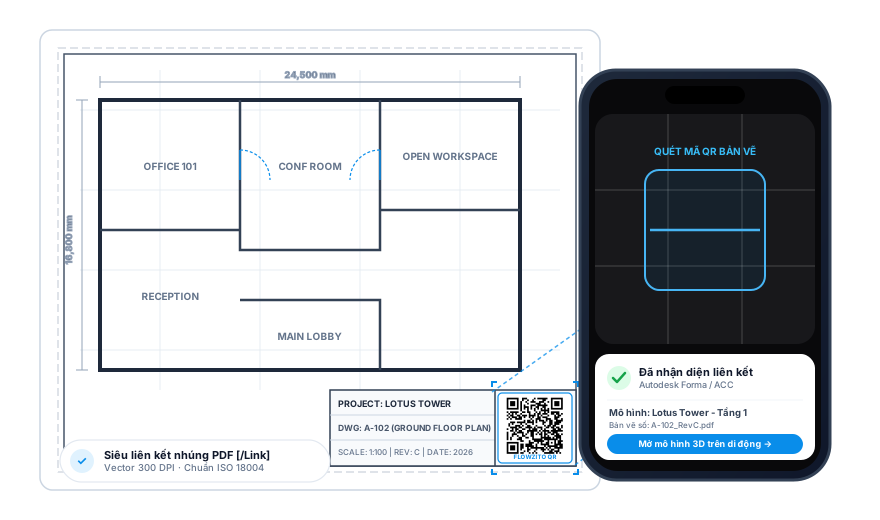
Automatically sync Autodesk Data Connector to track backlogs, overdue items, and workflow status without manual spreadsheet exports.
Each tool handles a clearly defined Forma Project operation, optimized for mobile screens with uncompromising safety controls.
Copy subfolder hierarchies between locations with optional ACL inheritance copy.
Copy folders and project files with resume checkpoints against network disruptions.
Create hundreds of folders from Excel templates with unmerged USER / ROLE / COMPANY matrix.
Prepare and batch add project members from a standardized workbook.
Inspect permissions by email, breaking down User, Role, Company, and Inherited access.
Add new members, assign roles and companies with Hub Role Catalog integration.
View direct & inherited permissions, safely edit ACLs with downgrade blockers and read-backs.
Generate drawings and specification PDFs with QR codes linking directly to models on Autodesk Forma/ACC.
Flowzito prioritizes strict data integrity rules for operational and administrative project workflows.
Workspaces are strictly isolated by Hub or Project. No cross-project leakage or accidental data mingling.
Fail-closed principle: halts on name collisions, strictly blocks downgrading inherited rights, and protects Manage privileges.
A true mobile experience: keyboard-safe sheets, fluid gesture navigation, Light/Dark modes, and bilingual support.
Every write is immediately read back from Autodesk servers to confirm 100% parity, producing structured audit logs.
A professional mobile toolbox for Forma Project tasks that demand speed, precision, and absolute data safety.
Flowzito is currently in internal TestFlight testing. Email hai@zhouworks.com to join the trial and share feedback.

