

At Friday's site meeting, the contractor opens the latest floor plan. The owner’s design management team looks at it and says, “We are still reviewing a different version.”
“The designer sent this one in the project chat,” the contractor replies.
So which drawing should the site team follow? The most recently received file may contain the latest design change, but that alone does not mean it has been checked and issued for construction.
This is a fictional example from Riverside Palace. It describes a problem familiar to most construction teams: the documents exist, but their purpose and status are harder to establish than their location.
The parties in the example are the owner (who commissions and owns the building), the design consultant (who prepares the drawings), the supervisor (who oversees construction) and the contractor (who builds).
A common data environment (CDE) provides an agreed way to manage project information: where it is kept, how it is checked, who receives it, and which information may be used for a particular task. It helps someone looking at a document answer a question that matters on site: “Can I rely on this version for the work I'm about to do?”

At a glance
- A CDE helps a project control access, review status and which documents are authorized for use.
- A project does not need a 3D model to benefit from controlled drawings, records and revisions.
- WIP (work in progress), Shared (open for coordination) and Published (formally issued) describe where a document stands; Archived holds superseded records. The newest file is not automatically a drawing issued for construction.
One drawing, three different understandings
On Monday, the design consultant sends floor drawing RP-T03, revision A, to the owner’s design management team for review. On Wednesday, the designer changes the position of a door and shares revision B through a chat group. The contractor downloads revision B. The reviewer, meanwhile, is still commenting on revision A. By the next site meeting, the parties hold different copies of the same drawing.
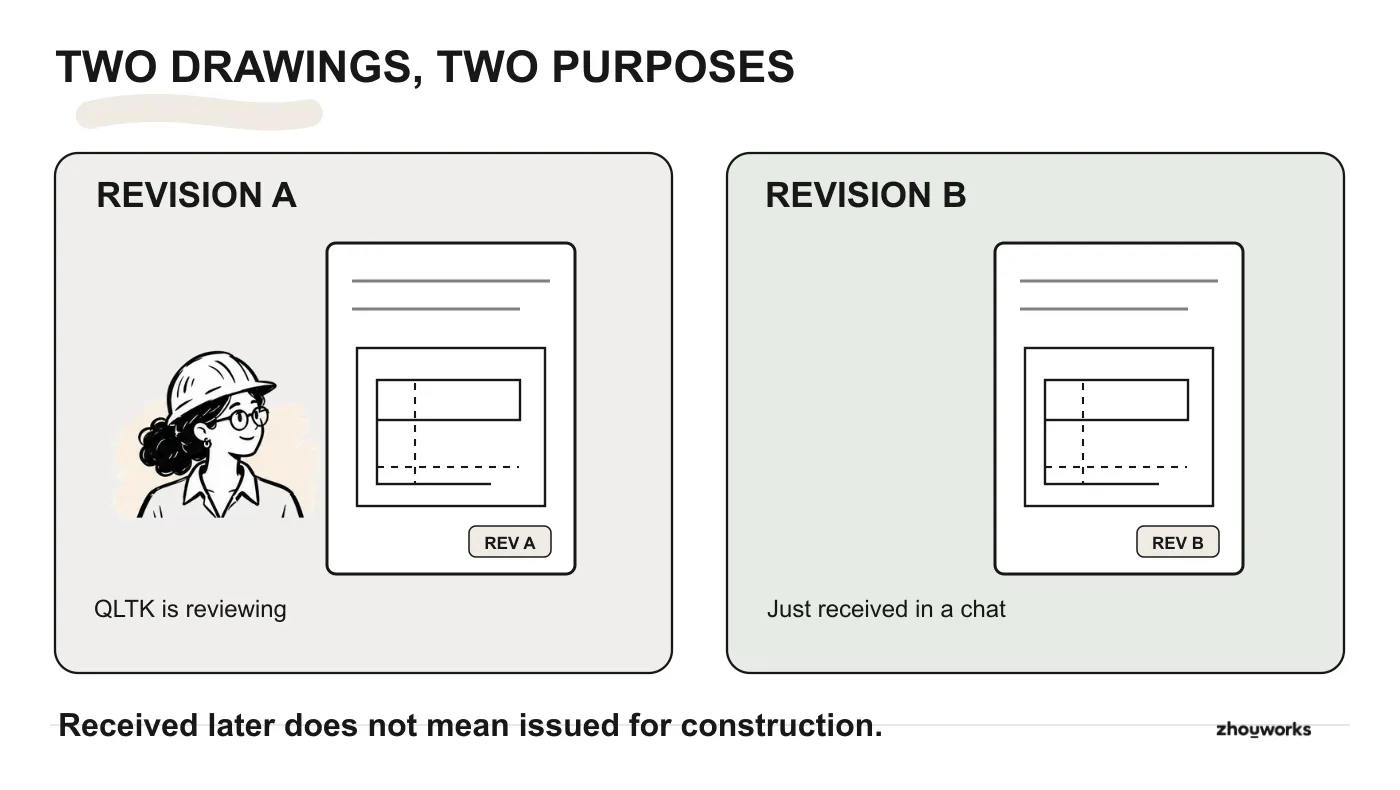
Fictional Riverside Palace example: receiving a later revision and receiving a drawing issued for construction are different events.
There are three separate events here:
- A new revision was received. The drawing has changed.
- A drawing was sent for review. Someone has been asked to check or comment on it.
- A drawing was issued for construction. The required checks, decisions and issue procedure have been completed.
If the authorized drawing is unclear, the site engineer should check the project issue register or ask the person responsible for issuing drawings before using it. Those events are easy to confuse when every exchange is just a PDF attachment or a link. File names such as final-v2 and final-new do not tell a site engineer whether an authorized drawing has been issued for construction.
The same problem affects shop drawings (the contractor's detailed working drawings), method statements, material submittals, specifications and handover records. Each document type moves between people for a reason. Keeping the files is necessary; knowing why they were sent and what happened next is what makes them useful to the project.
How does a CDE control drawing revisions?
At Riverside Palace, the team can agree on a managed location for drawings and correspondence.
The design team works on its own drafts. When a drawing is ready for coordination, the responsible person makes the intended revision available to the right reviewers. Reviewers record their comments and the outcome against that submission. After the agreed authorization and issue steps, the contractor can identify the documents released for its work. Earlier records remain available when the team needs to investigate a change.
This is close to the familiar paper-based drawing register and transmittal process, the written record of what was sent, to whom and when. The CDE brings that discipline into a shared digital workflow.
For any drawing, the project should be able to establish five things:
- What is this? Drawing number, title and originating organization.
- Which revision am I looking at? Is there a later revision, and what did it replace?
- Why was it shared? For comment, coordination, approval or construction use?
- Who acted on it? Who reviewed or authorized it, when, and with what decision?
- Who may access or use it? A contractor should not treat the designer's unfinished working copy as an issued instruction.
A shared folder may answer the first question. It rarely answers all five by itself. A working CDE needs agreed responsibilities, access rules and a review and issue process in addition to the storage platform. As CIBSE's discussion of common data environments indicates, more than one technical approach can be used.
Do you have to use BIM or a 3D model?
Building information modelling (BIM) is often introduced through impressive 3D models, Revit files and clash detection meetings. Those are familiar parts of many BIM projects, but they are not the whole story.
BIM concerns the creation, management and use of information about a built asset across project stages. Geometry matters, but so do specifications, equipment data, drawings and decisions. The Institution of Civil Engineers explains BIM through information management and use, rather than treating 3D modelling as the entire definition.
A CDE supports that exchange of information. It gives project participants a controlled way to know what has been shared, which version is being discussed, and whether an issue is suitable for the intended use.
You can establish a CDE on a project with no 3D model. PDFs, DWGs, spreadsheets, site photographs and signed records still need owners, review decisions and issue status. A detailed model does not remove those needs either.
One distinction matters: adopting a CDE does not, on its own, mean the project has implemented BIM. A BIM delivery plan may involve additional information requirements and modelling work. CDE practices are useful to projects that have not adopted those activities.
How WIP, Shared and Published work in a CDE
One way to explain WIP, Shared and Published is to compare a CDE to a project building. Each organization has its own working rooms, shared spaces support coordination, and an official notice area contains issued documents. Access to each area follows the project’s responsibilities and permissions.
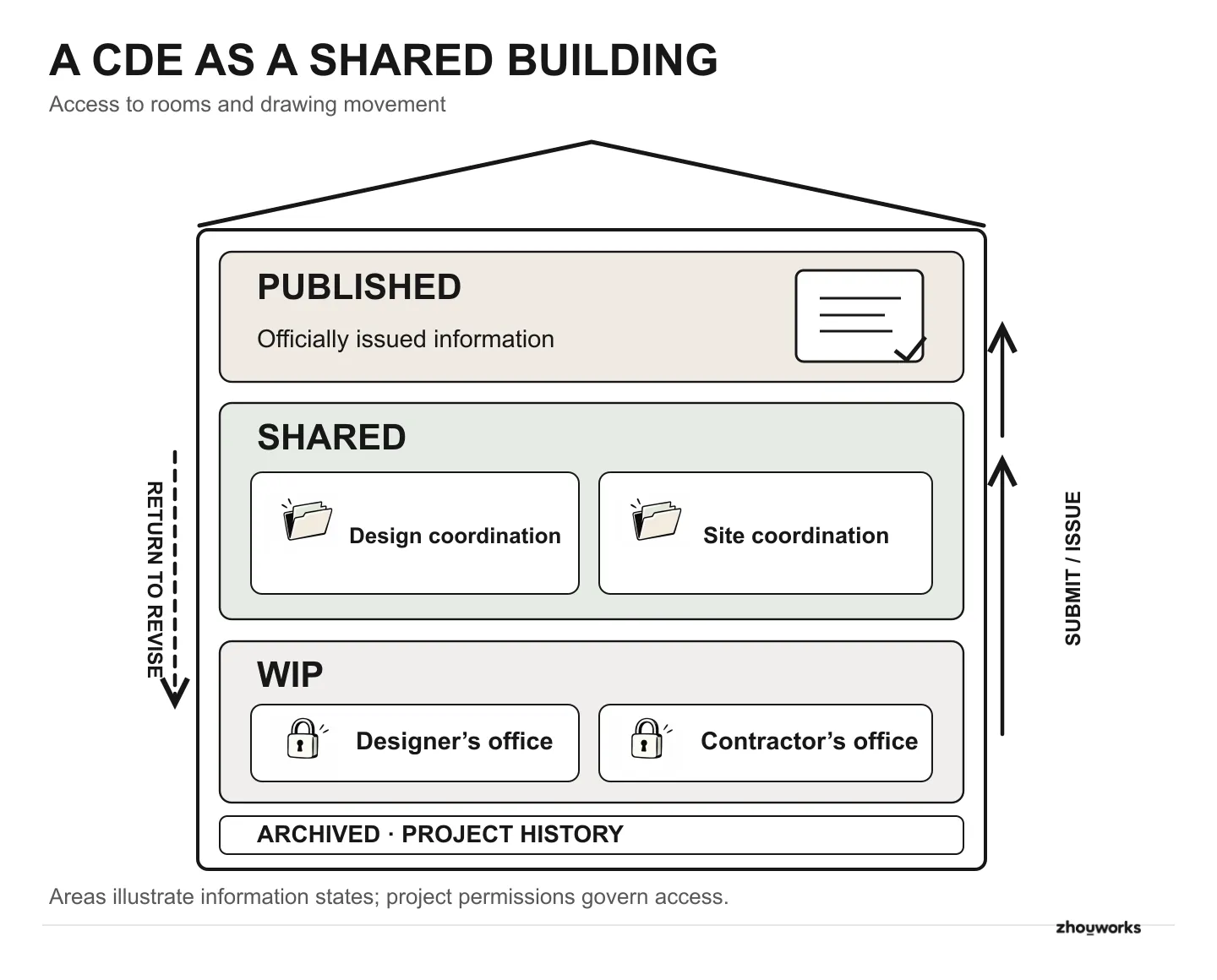
Illustration of separate working areas, shared coordination spaces and formally issued project documents.
The four states, following drawing RP-T03:
- WIP (work in progress): private work rooms. Designers prepare and check their drawings; the contractor develops shop drawings and method statements. The teams are responsible for their own working information. Other organizations do not automatically have access to those rooms. Any exceptions depend on the project's agreed permissions. Revision B stays here while the design team is still correcting it.
- Shared: coordination rooms. When a drawing is ready for input, the author makes the relevant revision available to those who need to work with it. One Shared area might support design coordination between architecture, structure and building services. Another could serve construction coordination among the contractor, the supervisor, the owner’s design management team and other parties. Access depends on purpose. Shared does not mean available to everybody, or approved for construction. Revision B moves here so reviewers can comment.
- Published: the project's official document area. This area holds documents that have passed the required checks, authorization and issue procedure. A contractor can identify drawings issued for construction here, provided they have access. The owner/client or an authorized delegate must have a defined role in the process. Moving a file into a folder called
Publishedcannot, by itself, authorize its use. - Archived: the records room. The project retains superseded issues, review comments and decisions so the team can investigate what happened when revisions changed. An earlier revision may be archived while the current issued revision remains in Published; archiving does not mean renaming the current drawing to an older revision.
What if a drawing is returned for changes?
At Riverside Palace, the designer revises drawing RP-T03 in WIP and submits revision B to Shared for coordination. The owner’s design management team, or whoever is responsible for approval at the next level, identifies a problem. The drawing returns to WIP for correction and checking; a new revision or version is then shared again. Once the required review, authorization and issue steps have been completed, the appropriate document may enter Published for its stated use. The earlier trail remains available for reference.
Some documents go through several rounds; others are intended only for coordination and never become construction issues. ISO 19650 is the international standard series for managing information on projects that use BIM; this article does not say whether it is mandatory in your country or on your project, so check your contract and the owner’s requirements. In ISO 19650-based practice, WIP, Shared, Published and Archived are called information states: the stages a document passes through, not necessarily four actual folders or building floors. Our guide to organizing WIP, Shared and Published for different project parties explores practical arrangements.
How is a CDE different from sharing Drive or OneDrive links?
Suppose a designer stores drawings in an individual cloud folder and sends a link to the contractor. The contractor downloads a copy and forwards it to the site team. The supervisor has another copy from email. When the drawing changes, each recipient has to be notified, and everyone has to check whether their saved copy is obsolete. Each organization ends up with its own store of files, so several copies of the same drawing exist with different content. This is a data silo: information locked in separate places that do not match. Switching from email attachments to links does not automatically solve it.
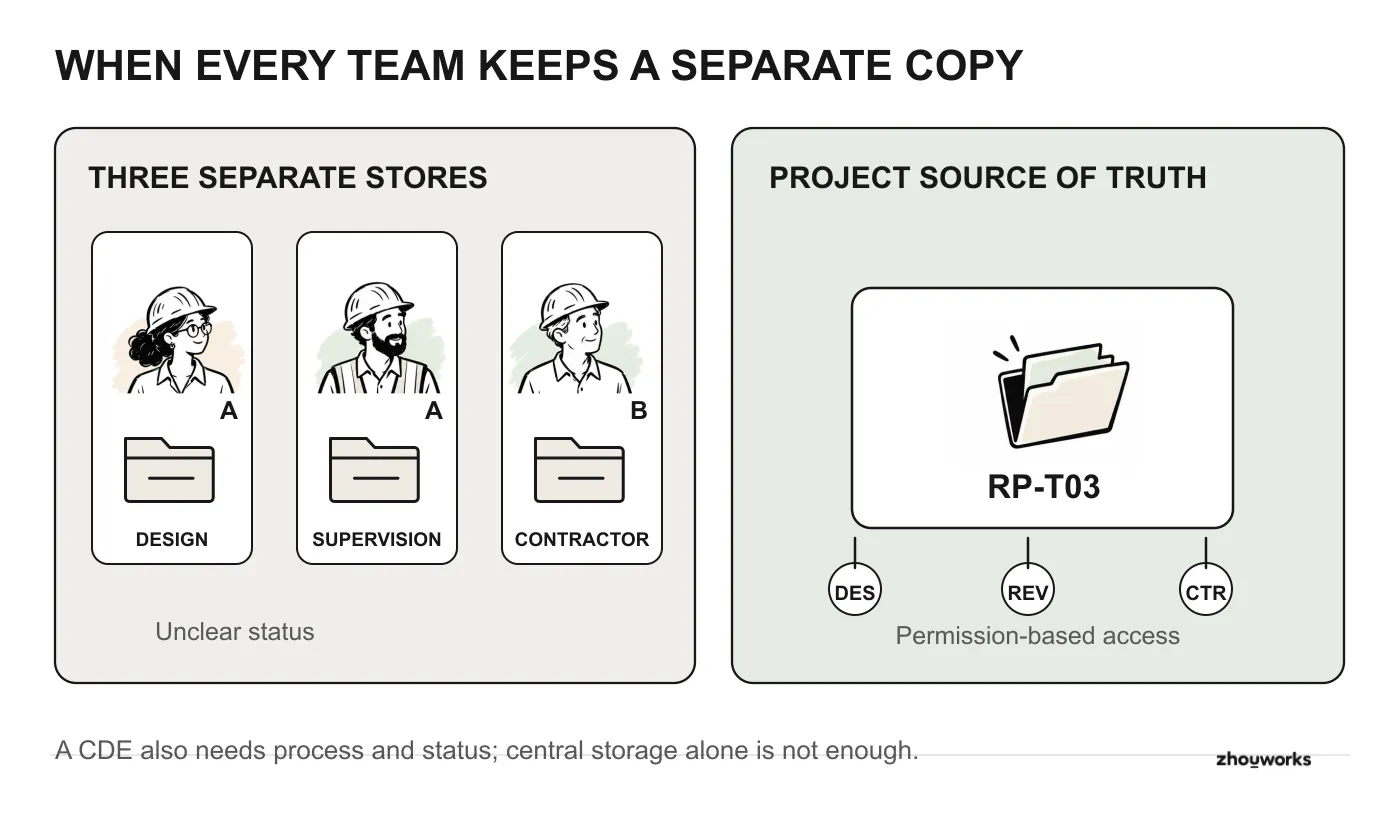
Separate document stores can leave project teams with conflicting revisions; a shared source needs clear access rules and document status.
Google Drive and OneDrive also support collaboration. The important distinction is whether the team relies on individual file sharing or a centrally governed document location. Google's Shared drives can hold files owned by a team rather than an individual. OneDrive is particularly suited to an individual's working files and selective sharing, while Microsoft positions SharePoint for team and organizational documents. These platforms also offer collaboration and version-history capabilities.
If the project owner sets up a central SharePoint site, document libraries, permissions and approval procedures, many of the elements of a CDE can be implemented there. The trade-off is the work required to design and maintain that arrangement for several companies and document types. Different permissions on sites, libraries, folders or individual files can become hard to audit. For example, if a subcontractor’s drawing folder is opened to a few people outside the library’s normal permissions, months later it is hard to say with confidence who can see what. Microsoft documents the inheritance and unique-permission model; it is powerful, but the project needs someone to administer it carefully.
The useful CDE difference is that the working rules are agreed before anything is uploaded. The project defines who can enter each area, who may submit or review information, who authorizes an issue and how recipients recognize its status. Users go to a governed project location where the current authorized information and its history are visible according to their permissions. They do not need a new one-off sharing invitation for every revision. In this setting, “current” means valid for the intended purpose, not simply uploaded most recently.
Construction document management platforms, including Autodesk Forma Data Management (an Autodesk product), provide tools for parts of that process, such as formal review and approval. The project still needs explicit responsibilities and operating rules. Our next article examines when to choose Forma Data Management as a CDE platform.
Where should a new project begin?
Before configuring a platform, the owner and project team (or any party holding the document set, such as the contractor or a consultant) can take an actual drawing and agree on three points:
- Who prepares it, reviews it and authorizes its issue? The system administrator may have no professional authority to approve the design.
- How can a recipient distinguish a drawing sent for comment from one issued for construction? The answer needs to be visible in the agreed record, rather than buried in someone's chat history.
- When the designer changes it, how will the contractor know what has been superseded? The project needs to retain the previous record as well as identify the current issue.
Those answers give the team something concrete to configure. Folder structures, company permissions and software choices come next. The next step in this series is planning the people and processes needed before setting up a CDE.
One small step you can take this week: take a drawing set that is already in use, list its last few issues and write next to each who authorized it. Any gap you cannot fill is where a CDE has work to do. This article does not cover cost or software licensing; check directly with Autodesk or a reseller.
At the next site meeting, the team should be able to check which revision was issued for the work and which is still under review.
Keep reading
BIM CDE7 min read
Before Setting Up a CDE: People, Processes and Project Rules
A submitted drawing is returned for correction while an earlier issue remains in use. Agree who decides, who sees which file, and what evidence is needed before configuring your construction CDE.

Reading3 min read
Active Reading: A Practical Guide
A practical way to read with purpose and keep useful ideas.