

At the example Riverside Palace project, the design team has just submitted Revision C, but the contractor is still building from Revision A. Which drawing may be built? The letter C or A does not settle it. You need to know whether the drawing has been formally issued, and whether it appears in the handover record from design management (DM) to construction management (CM). This article returns to that question in the section on controlling review and issue.
To answer it reliably, the project has to agree a few things before creating a project in Autodesk Forma Data Management. A common data environment (CDE) is the shared place where participants store, exchange and find project information under agreed access rights and procedures. It works only if the project has agreed responsibilities, review and issue steps, access boundaries and document identifiers. For the underlying idea, see how a CDE works through a construction drawing.

At a glance
- Assign a Project Admin, the person who manages the project's configuration in the system and understands the workflow; system administration and technical approval are different responsibilities.
- Agree on participants, permissions, document flow and revision (numbered amendment) rules before creating the Project.
- Use a small reusable role catalogue and test real project scenarios to support consistent setup and staff changes.
Who runs the CDE, and who approves the drawings?
Give each project at least one designated Project Admin. This person configures members, folders and access rights; they do not approve drawings. They should understand the actual contract and workflows, so they can translate approval responsibilities, organizational boundaries and submission rules into settings. Have a deputy or second administrator so the project does not depend on one person: Autodesk recommends multiple project administrators.
Administrative power does not create professional approval authority. The admin may be able to manage member access while the design lead, supervisor or owner representative remains accountable for the technical decision.
Riverside Palace might assign the responsibilities this way:
| Task | Operational lead | Decision or record |
|---|---|---|
| Coordinate design disciplines and submit | Lead design consultant | Authorized design representative |
| Receive and route submissions through approval levels | Owner’s design management (DM) | Designated owner approvers |
| Perform independent design checking when commissioned | Third-party design checker | Checking report within agreed scope |
| Formally issue and hand over drawings | DM | Authorized issue and signed handover to CM |
| Distribute construction drawings to contractor and supervisor | Construction management (CM) | Effective issue instructions |
| Coordinate project-wide delivery and answer RFIs | Project management (PM), CM, design consultant | Contractually assigned responsibilities |
| Configure project access | Project Admin | CDE owner |
Each project fills the last two columns from its own organization; the table above is the Riverside Palace example.
Who needs access to which documents?
Prepare a register of the owner, architects, structural and MEP designers, supervisory consultants, main contractor and relevant subcontractors. Record each person's company, project role, email, access purpose, start/end dates and accountable sponsor. For example, the contractor needs access to issued drawings, not the design consultant’s unfinished working files. Configure access around that distinction before inviting everyone.
Record access and professional responsibility separately: a contractor may view issued drawings, while the design manager has an assigned review responsibility. The table below is a planning note for the project team to discuss and agree, not a screen of settings in the software:
| Role group | Purpose | Example |
|---|---|---|
| Access group | Defines view, upload, edit and administration rights within a specified information scope | Design document editors, issued drawing viewers |
| Responsibility group | Identifies a business position or responsibility to identify participants in the project review process | Design manager, approver, handover lead |
One person may hold several roles (a role is a named set of access rights or duties). A DM manager may have permission to view submissions and separately be assigned an approval responsibility. Replacing that person should update assignments without rebuilding the underlying rules. Keep role definitions reusable across project templates (a standard setup you can apply to later projects) and add roles only when an actual difference in access or responsibility warrants it.
Autodesk’s approval-workflow guide allows initiators, reviewers and approvers to be selected by individual, role or company. That does not make the two planning groups above separate product role types; test the actual configuration and membership before use.
Access can come from three levels: the company, the role and the individual user. Check all three when you prepare the permission matrix, the table recording who may view, upload, edit or manage each area.
What must the CDE control during review and issue?
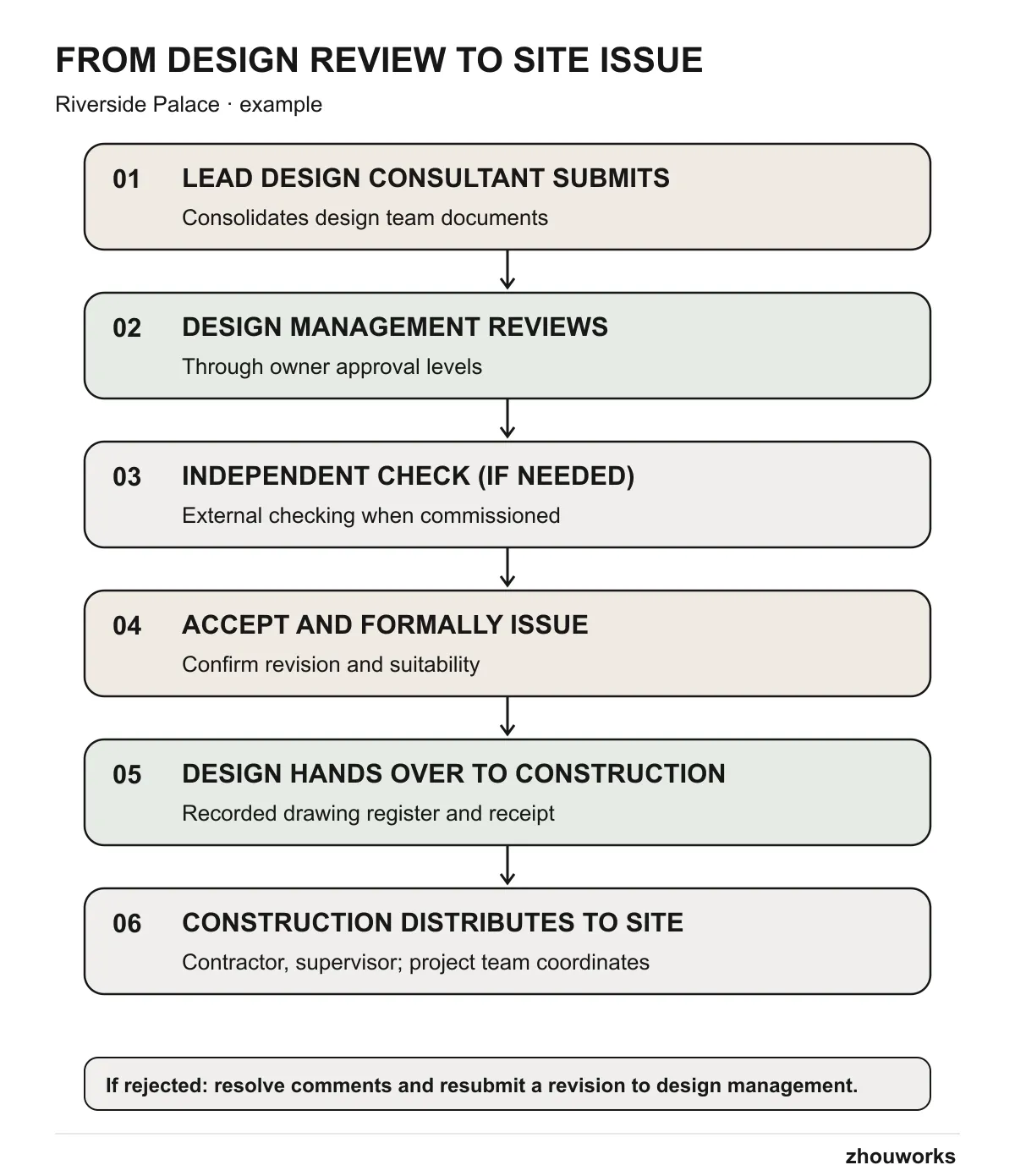
For Riverside Palace, the CDE configuration needs to establish who submits, reviews and issues documents; where comments are recorded; and which revision (numbered amendment) is effective. Resubmissions should be traceable to comments on the previous revision.
The system must distinguish documents under review, formally issued documents, and documents handed over from DM to CM. The drawing register and handover record need to be easy to find so CM can distribute the correct issue to contractors and supervisors. Assign owners for optional independent checks and requests for information (RFIs) where relevant.
Four information states are commonly used in a CDE: WIP, Shared, Published and Archived.
- WIP (work in progress): documents still being prepared inside a team, not yet for others to use.
- Shared: documents shared for coordination or review, much like a submission.
- Published: documents formally issued.
- Archived: documents kept for later reference.
These describe information states and do not necessarily require four literal folders. See how documents move through a CDE.
Back to the opening example: while Revision C is being submitted and reviewed, it is not yet an issued drawing. Only when Revision C is formally issued and appears in the DM-to-CM handover record does CM distribute it to the contractor; until then the contractor keeps using the issue already distributed under the existing handover record.
Agree where documents belong and how to identify them
Only after mapping the flow should you choose where authoring groups work, where cross-team submissions live and where controlled issues are stored. Owner-only submissions and broader inter-company coordination lead to different Shared folder designs, which that article compares.
Agree a small set of predictable document identifiers: project, originator, discipline, document type and serial number are one possible starting point. Define revision, suitability and review outcome separately, with examples that designers can follow. A technically comprehensive but unusable naming convention will invite workarounds. We cover naming standards and custom attributes in Forma in a dedicated article.
Document the setup decisions before configuration
The owner and delivery teams can use a shared decision record with seven sections. Each decision should have someone responsible for confirming it:
| Section | Record the decision |
|---|---|
| Ownership | Hub owner (the Hub is the owner-level space that holds the projects in Forma), lead and backup administrator, information manager |
| Participants | Companies, roles, named members, join/leave dates |
| Workflow | Lead design submissions, DM approval levels, optional checker, DM→CM handover, construction issue and RFI flow |
| Documents | Folder zones, document identifiers, revision rules and metadata (required details on each document, such as revision and review status) |
| Access | Which role can view, upload, edit or manage each zone |
| Acceptance tests | Realistic users and actions that must be allowed or denied (for example, the contractor can open an issued drawing but is blocked from the design consultant’s draft folder) |
| Operations | Support contact, periodic access checks, export and handover |
Use the table to agree the CDE setup with the relevant design, supervision and construction leads. Before configuration starts, assign an owner to each outstanding decision and confirm the approval and issue authority established for the project.
When is the project ready for Forma setup?
Use Riverside Palace’s floor plan as a practical check: who submits it, where are DM decisions recorded, where is the handover to CM, and which issue does the contractor receive? If the design and construction leads give different answers, agree on the process before setup. If they agree, move to setting up the project in Forma and then verify the experience with ordinary member accounts.
Set responsibilities, permissions and folder arrangements in line with the project's contractual information requirements and working procedures.
Keep reading

BIM CDE11 min read
What Is a CDE? Start With the Drawings Used on Site
The design team, reviewer and contractor may all have a different copy of one drawing. Follow that drawing through a CDE and see why information control matters with or without BIM models.

Reading3 min read
Active Reading: A Practical Guide
A practical way to read with purpose and keep useful ideas.