

At the end of the day you have done a lot, but still wonder where the time went. A time audit is a short record of how you actually spend part of your day, followed by a review of what you might change. The aim is to understand your schedule, not grade every minute.
You do not need special software or a record of your entire private life. Start with one workday, use approximate time blocks and choose one small adjustment after reviewing them.
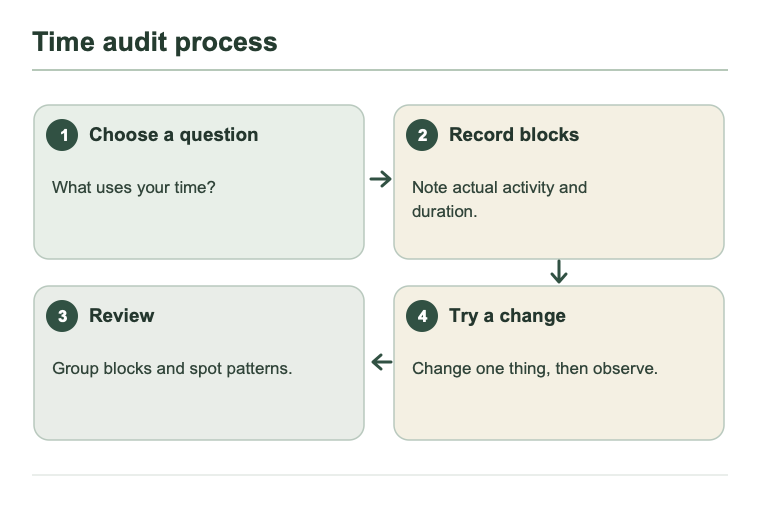
1. Choose a question and a boundary
A specific question makes the record useful: “Why does my report keep getting pushed to the end of the day?” or “Is there a quiet window in the morning to prepare my proposal?” Record only working hours if that is what you want to understand. There is no need to include sensitive personal information or details about other people.
Cornell's Learning Strategies Center suggests accounting for fixed commitments, meals, rest, everyday activities and flexible time when planning a schedule. Its guidance is for study, but the idea of leaving room for real needs can also help you look at a workday.
2. Record enough to see the day
Use paper, a calendar or a digital note. When you switch activities, jot down the approximate time, what you did and a brief note if helpful. You can record as you go or look back around lunch and at the end of the day. Group short interruptions into an approximate block; mark a gap “unknown” rather than guessing. This is an invented example:
| Time | Activity | Note |
|---|---|---|
| 08:30–09:15 | Prepare report | Need more figures |
| 09:15–10:00 | Talk with team | Clarified client request |
| 10:00–10:15 | Break | Got water |
| 10:15–11:00 | Handle a new request | Did not return to report |
You do not need to track every minute or record the contents of conversations. A meeting, helping a colleague or taking a break is not automatically wasted time; its value depends on context. If logging feels stressful or takes too much effort, record less or stop.
3. Review what happened

Review the day with curiosity, not judgment.
At the end of the day, return to your original question:
- When did you have time for the work that needs your attention? Was there enough time to begin?
- When did unplanned requests arrive? Which actually needed an immediate response?
- Was there room for meals, rest and transitions between activities?
- Are there missing records, or was today unusual?
In the example, a new request arrived before the person returned to the report. One day suggests something to investigate; it does not prove every morning looks the same. If helpful, record a few different days. There is no mandatory number.
4. Try one small change
Choose something within your control: prepare the figures the afternoon before, reserve a short early block for the report, or agree with the team on when to collect non-urgent questions. If your work is mostly reactive, you can record a few larger blocks and, where possible, discuss how to collect non-urgent requests. Not every role can turn off notifications or decline interruptions; adapt to your actual responsibilities.
In the example, the report writer might try gathering the figures the afternoon before. After a few days, ask: did the change make the work easier to start? Did it create difficulty for a customer or colleague? Keep, adjust or abandon the experiment based on the answer. If you have found a suitable focus window, Deep Work vs Pomodoro offers ways to use it.
A time audit is a temporary observation tool. Once you understand enough to make a decision, you can stop recording and spend the time working or resting instead.
Keep reading

Methods3 min read
The Pomodoro Technique: A Practical Guide to Focus Sessions
A practical Pomodoro guide with an engineering workflow example, session tracker and rules for adapting timing.

Methods3 min read
Deep Work vs Pomodoro: Which Fits Your Day?
Choose a focus session that fits the work and the time you have.