

The project workspace is configured in Autodesk Forma Data Management. Can a contractor still open an unfinished design drawing, or mistake a reviewed file for an authorized construction issue? Before go-live, test those situations with ordinary user accounts and hand the results to the people who will operate the system.
For the fictional Riverside Palace, the team has already agreed its roles and procedures, project setup, information structure, permissions, metadata and reviews. Construction work is about to start. Can the contractor reliably retrieve the current issued drawing without accessing a design draft?
Here, a common data environment (CDE) is a controlled way to store and exchange project information. User acceptance testing (UAT) checks what real team members can do. Work in Progress (WIP) holds unfinished authoring material; Shared describes information exchanged under project rules. A software version is a stored file iteration, while a revision follows the project's document convention. A Holding Area handles nonconforming uploads when configured. A tenant is the organization's configured software environment.
Walk through a single UAT scenario in the product
Choose one sample document version and one reviewer. Run the scenario in Files and Reviews with representative role accounts, then compare each observed screen with the expected behavior rather than relying on a Project Admin test.
| Test action | Evidence to record | Pass criterion |
|---|---|---|
| Submitter opens folder and file | Folder path and visible controls | Access matches the role matrix |
| Submitter starts Review | File/version and assignee | Correct version reaches the intended participant |
| Reviewer responds | Markup, status and acting account | Workflow records the decision |
| Team checks release | Published file location and version | Matches the project's issue rules |
Record PASS/FAIL, a screenshot reference, and a correction owner for each checkpoint. Repeat the test after changing grants or workflows; approval status alone is not evidence of contractual issue.
Test the work people actually perform
Use a small set of authorized sample files: two PDFs, a drawing file and a spreadsheet. Prepare representative accounts for the designer, supervisor, contractor, owner and Project Admin. For each test, log initial state, action, expected outcome, observed result, owner and fix. An admin impersonating everyone is not an adequate permissions test.
| Case | Test | Acceptance condition |
|---|---|---|
| U01 | Invite a design consultant | Correct Company, Role, tool access and relevant folders |
| U02 | Upload a new draft into WIP | Allowed for the designer; restricted members cannot access it |
| U03 | Contractor attempts WIP access | Access denied under the approved matrix |
| U04 | Upload a file with an invalid name or missing required field | Record the validation response and Holding Area behavior if enabled; compare with the agreed rule |
| U05 | Update a drawing and open file history | Earlier versions are identifiable, and system versions are distinct from the project revision designation |
| U06 | Supervisor opens Shared material | Correct file and version visible for review |
| U07 | Reject a review submission | Decision traceable; rejected document is not silently issued |
| U08 | Approve a review submission | Correct approver and file/version; optional copy matches workflow settings |
| U09 | Issue an authorized package | Contractor can identify the documents and their permitted use |
| U10 | Remove a departing member | Direct, Role and Company grants are checked for residual access |
Expected results depend on the project's configuration. Test the Holding Area only if it is enabled; do not mark U08 as failed for a missing copy when the workflow does not call for one.
Example U03 test record (fictional): action — sign in as the contractor and follow a link to a WIP drawing; expected — access denied; observed — drawing opens; owner — Project Admin with the permissions owner; correction — trace Company, Role and User grants, fix the approved matrix and retest U03. Keep evidence of the actual result and the retest.
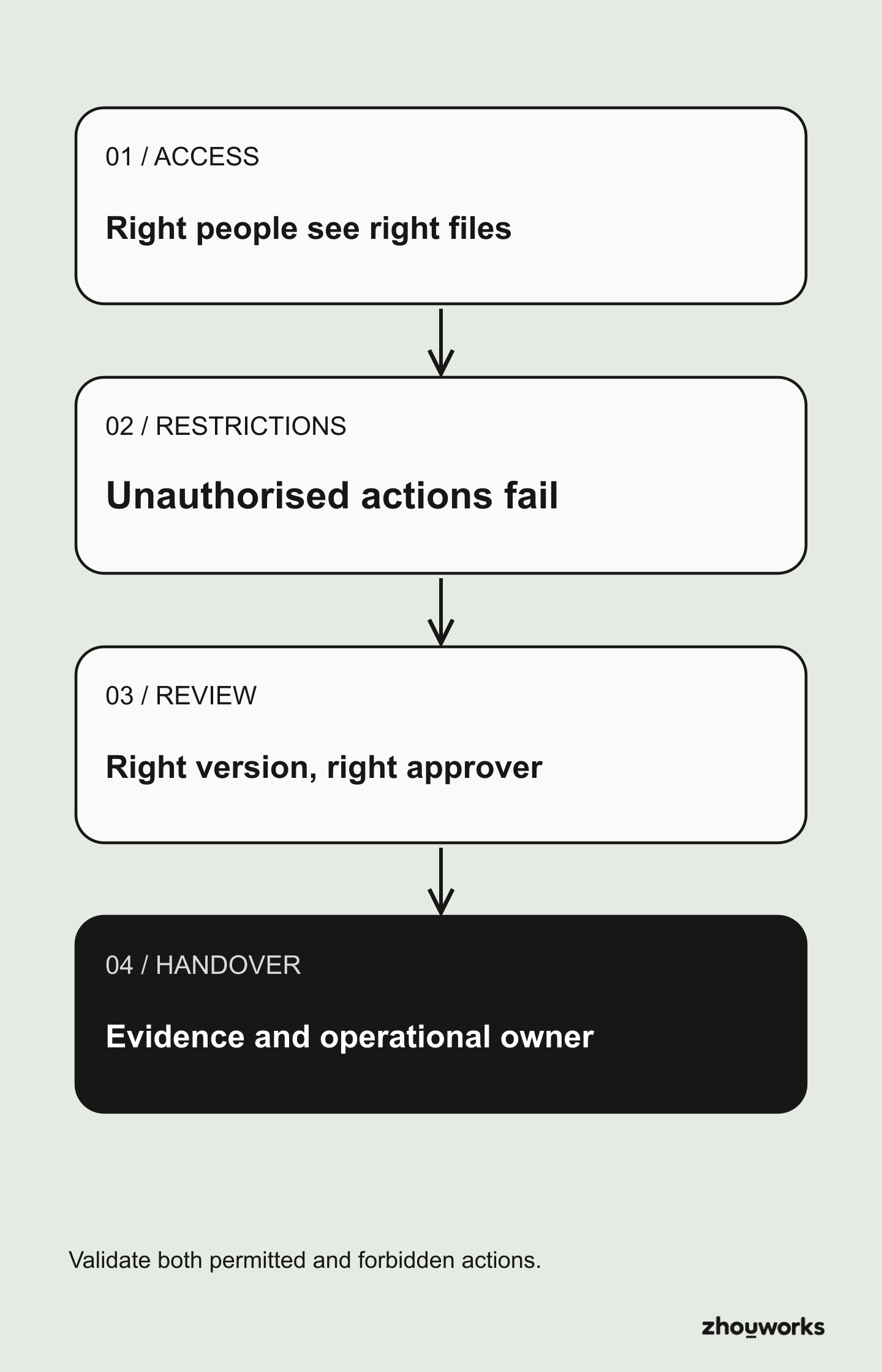
This summarizes user-based acceptance: perform a scenario, compare the outcome, correct failures and retest. An administrator seeing the expected folder tree does not prove UAT has passed.
Four questions that matter more than a dashboard
Who owns the environment? Identify the Hub/Project owner, primary Project Admin, backup and long-term support contact. Confirm the backup admin can still grant the right access if the primary admin leaves.
Who can access what? Keep a versioned permission matrix, member register, exceptions and external sharing policy. Autodesk's inheritance rules mean revoking one user's direct grant does not necessarily remove access inherited from their company or role.
Which document may be used? Check the current file version, contractual revision, review decision, suitability and record of issue. Approval and controlled issue are separate decisions. A software status alone may not establish construction authorization.
Can the team recover the history? Choose a superseded drawing and ask a new participant to find the earlier version, the review outcome and the newer issue. If the team must reconstruct this from personal email, the process is incomplete.
Check Build records in the handover
If the project uses Forma Build, a handover package may need Sheets, Forms, RFIs, Submittals, Issues, Photos and Assets alongside Files. Autodesk — Assemble a Handover Package describes selectable record types, while As-built export supports selections of records and related attachments. Verify completeness, versions, attachments, recipients and actual access before acceptance. A technical export does not replace contractual completion and handover procedures.
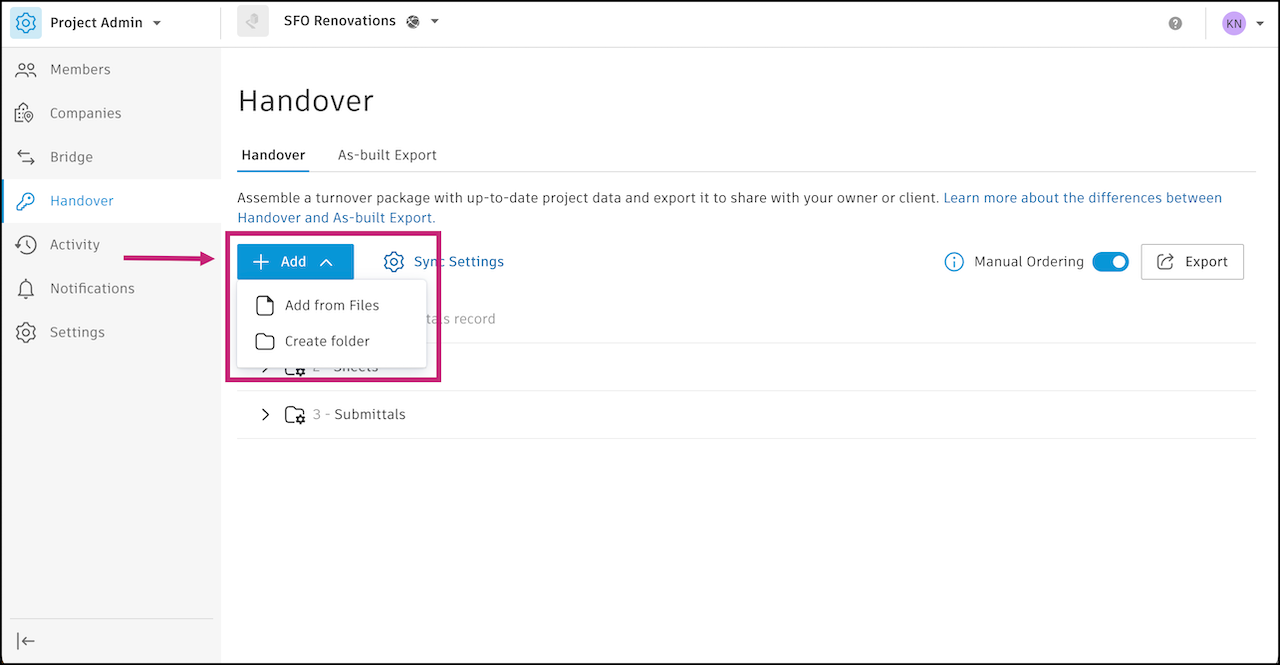
Image source: Autodesk Help.
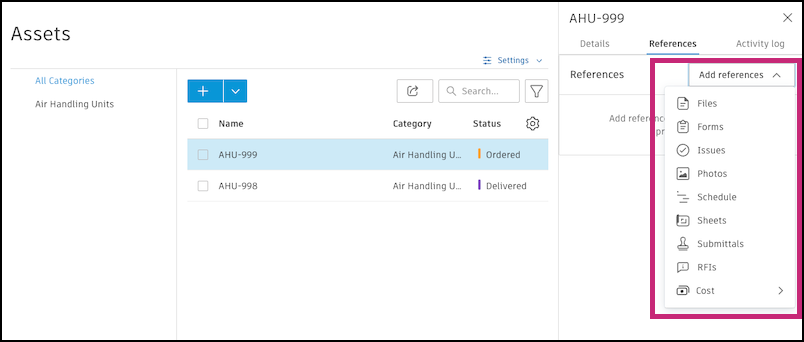
Image source: Autodesk Help.
What to include in the CDE handover
Provide a concise package: CDE structure map, member/role inventory, permission matrix, naming and attribute register, review/issue rules, exception log, UAT results, support procedures, staff replacement process, and retention/export responsibilities.
Ask the receiving administrator to reproduce one end-to-end flow: invite a new designer, submit a checked file, review it, and distribute an authorized issue. If only the original installer knows how to do it, handover has not succeeded.
Also clarify subscription ownership, retention periods, project closeout, provider obligations and an agreed plan for exporting or recovering information when required. The project team still decides who may access records, how long they are kept and how to retrieve them at closeout.
Operate and review after go-live
Schedule checks appropriate to project risk for departing members, permissions changed since approval, invalid filenames, overdue reviews, superseded issued documents and closeout records. Record who will investigate each exception, when they should act and how to confirm the correction.
When a company runs many projects, bulk folder creation, member imports, permission checks and workflow monitoring can be candidates for automation. Any automation still needs preflight checks, a recorded outcome and verification from the intended user's perspective.
Tools and testing responsibilities
ZhouWorks has published Flowzito, an extension that supports work with Autodesk Forma, at zhouworks.com/flowzito. Teams considering automation should first agree their procedures, check the results of any repetitive actions and test with accounts holding the intended permissions. Flowzito is developed independently by ZhouWorks and is not sponsored by Autodesk.
This checklist is a framework for discussion and testing, not an ISO 19650 certification or a security/availability assessment of a specific tenant. Project acceptance requirements must be approved under the relevant contract and operational policy.
CDE operational acceptance checklist
ZhouWorks practice template: copy this table to fill it in, using non-sensitive samples. Outcomes depend on project configuration.
| Done | Evidence required | Sign-off owner |
|---|---|---|
| ☐ | Sample follows submission, review and issue path | … |
| ☐ | Member accounts verify both allowed and denied access | … |
| ☐ | Permission matrix, naming rules and support contact exist | … |
| ☐ | Access review and staff-change routine are scheduled | … |
Keep reading
BIM CDE7 min read
WIP, Shared and Published in Forma: Two Practical Folder Models
Choose a Forma folder design from the way project teams exchange information, with two Shared models and version-control examples.
BIM CDE6 min read
Forma Folder Permissions: Roles, Companies, Users and Six Access Levels
Use a practical permissions matrix to control who sees, uploads, edits and manages construction project documents in Forma.